Hiya Spam Blocker is one of the most downloaded call protection apps in the world, and once you understand what it does, it’s easy to see why.
Every day, millions of phone users deal with robocalls, fake texts, telemarketer interruptions, and scam attempts that get more sophisticated by the month.
Read on to learn exactly how Hiya works, why it stands out from the competition, and how to set it up on your device in under five minutes.
What Is Hiya and Why Does It Matter?
Hiya is a spam blocker and caller ID app developed in Seattle, currently serving over 500 million users globally.
Unlike consumer-only apps that rely entirely on user reporting, Hiya operates at the carrier level — with active partnerships at AT&T, T-Mobile, and Samsung that give it access to network-level threat intelligence.
In 2024 alone, Hiya’s integration with Samsung helped detect and block over 31 billion fraud and spam attempts.
That scale is what separates Hiya from most competitors. It’s not just a blocklist app — it’s a carrier-grade intelligence platform wrapped in a simple, free-to-download package.
For everyday users, this means the app starts protecting you immediately after installation, without requiring manual configuration or a lengthy setup process.
The Problem Hiya Was Built to Solve
The volume and sophistication of spam calls has reached a point where manual screening is no longer practical for most people.
Americans receive billions of unwanted calls every month. Scammers now use AI-generated voices, number spoofing, and highly convincing phishing texts to manipulate even cautious, informed users.
What used to be obviously fake robocalls have evolved into targeted scam attempts that mimic real banks, shipping companies, and government agencies.
Even the best habits — not answering unknown numbers, checking caller ID — aren’t enough when spoofed numbers appear to come from local area codes or contacts you recognize.
Hiya was designed to intercept these threats at the source, before your phone rings, before a suspicious text lands in your inbox, and before you have to make a split-second judgment call.
As a top spam call blocker, Hiya handles identification, labeling, and blocking — automatically — so you don’t have to think about it at all.
Hiya’s Core Features Explained
Color-Coded Caller Identification
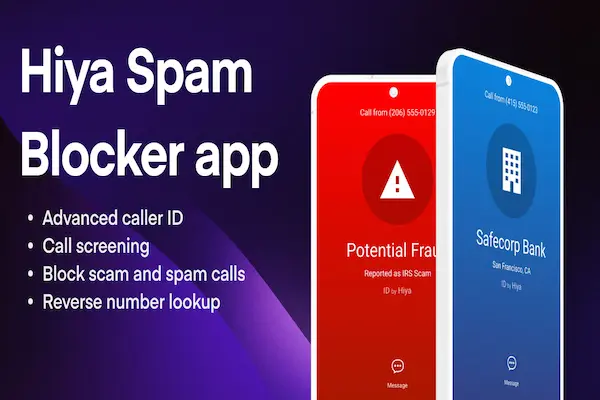
Every incoming call is analyzed in real time and displayed with a color-coded screen that tells you exactly what kind of call you’re receiving before you answer.
Green means it’s likely a legitimate or verified caller. Yellow flags the call as potentially suspicious. Red indicates a high-confidence spam, fraud, or robocall detection.
This visual system makes decision-making instant. You don’t need to read text or interpret labels — a single glance gives you the answer.
Hiya’s database covers millions of business numbers and flagged spam sources worldwide, making this identification accurate enough to act on with confidence.
Automatic Spam and Robocall Blocking
Hiya functions as a best robo blocker by automatically intercepting calls that match known robocall patterns, telemarketer signatures, and fraud profiles — sending them directly to voicemail or blocking them entirely.
The AI engine powering Hiya Protect processes billions of calls per month, learning from new spam campaigns as they emerge and updating protection in real time for all users.
This means Hiya adapts to tactics that other apps haven’t catalogued yet — a meaningful advantage as scammers constantly rotate their methods to avoid static databases.
As a best cell phone call blocker, Hiya’s automatic blocking works without any manual input: no list management, no rule-writing, no daily updates from you.
SMS Filtering and Text Protection
Spam isn’t limited to voice calls. Hiya’s text filtering capability works as an effective best app to stop spam texts, analyzing incoming SMS messages for suspicious links, scam keywords, and known phishing patterns.
Flagged messages are separated from your main inbox so they don’t cause alarm, but they’re still accessible if you need to review them.
This dual protection — calls and texts covered by the same app — is what makes Hiya stand out as a true best spam text and call blocker, rather than a tool that only handles one channel.
Community-Driven Spam Reporting
Every time a Hiya user marks a number as spam or fraud, that data is immediately shared across the entire user network.
With hundreds of millions of users contributing reports, this community intelligence updates faster than any algorithm working independently.
This is why spam blocker reviews consistently highlight Hiya’s detection accuracy — it reflects real-world reporting, not just lab-tested scenarios.
When you flag a call, you’re not just helping yourself. You’re improving protection for millions of other users who might receive the same call minutes or hours later.
Reverse Phone Lookup
Missed a call from an unknown number? Hiya’s reverse lookup feature lets you search any phone number to find out who it belongs to, what type of organization is associated with it, and whether it has been flagged by other users.
This is useful both for screening missed calls and for verifying whether a number that texted you is legitimate before responding.
How to Download Hiya on iPhone
Getting Hiya running on iOS takes under five minutes, but there’s a crucial setup step most guides skip — enabling the correct iOS permissions.
- Open the App Store and search for Hiya: Spam Blocker & Caller ID.
- Tap Get to download and install the app for free.
- Open Hiya and complete the initial setup — choose your protection level and review the permission requests.
- Go to Settings → Phone → Call Blocking & Identification and enable Hiya’s toggle.
- Go to Settings → Messages → Unknown & Spam and enable Hiya for SMS filtering.
- Return to the Hiya app and add important contacts to your allow list if needed.
- Protection begins immediately — no additional steps required.
As the best app for blocking spam calls iPhone users consistently recommend, Hiya’s iOS integration is clean and reliable once both permissions are active.
If you want a second layer of protection, iOS also offers a native “Silence Unknown Callers” toggle under Settings → Phone that automatically sends unrecognized numbers to voicemail — a useful complement to Hiya’s active blocking.
How to Download Hiya on Android
Android setup gives Hiya more flexibility, which is part of why it works so well as an android app spam call blocker on most major device brands.
- Open Google Play and search for Hiya: Spam Blocker & Caller ID.
- Tap Install to download the app.
- Open Hiya and go through the setup wizard — grant call screening and SMS permissions when prompted.
- Set Hiya as your default caller ID app when prompted for the best identification experience.
- In the Hiya app settings, select your preferred protection level: label only, or auto-block high-confidence spam.
- Enable SMS filtering in the app settings to protect your texts as well.
- Add trusted contacts and numbers to your allow list to prevent false positives.
As a best call spam blocker Android option, Hiya integrates smoothly with most Android devices from Samsung, Google Pixel, OnePlus, and others.
Samsung users in particular benefit from Hiya’s deeper OS-level integration, which allows protection to operate at the network layer — before the call even reaches the device’s standard phone app.
Hiya vs. the Competition
Choosing the right protection tool means understanding what Hiya does well and where alternatives might offer something different.
Hiya vs. RoboKiller: RoboKiller is a stronger option for users who want the best spam app for Android or iPhone with maximum aggressiveness — its Answer Bots waste scammers’ time and it claims 99% blocking rates. However, it costs $4.99/month after the trial. Hiya offers comparable real-world protection with a fully functional free tier.
Hiya vs. Truecaller: Truecaller has a larger global user base and strong best phone number blocking app functionality for international users. For US-focused users, Hiya’s carrier partnerships give it a meaningful advantage in identifying domestic spam numbers with high accuracy.
Hiya vs. Nomorobo: Nomorobo is an excellent robo call blocker Android and iOS option — particularly its audio captcha system for eliminating robocalls. For users who want a broader feature set including SMS protection and reverse lookup at no cost, Hiya’s free tier covers more ground.
Hiya vs. YouMail: YouMail is the strongest option as a spam removal app at the voicemail level — ideal for business users who need call recording, virtual receptionist features, and second phone numbers. For everyday consumer protection, Hiya’s interface is simpler and the free tier more complete.
Is Hiya the Best Telemarketer Blocker App?
Telemarketer blocking requires a slightly different capability than robocall detection.
Robocalls come from automated systems using rotating numbers — easier to detect by pattern. Telemarketer calls often come from real businesses with legitimate registered numbers that don’t appear in standard spam databases.
Hiya addresses this by giving users the ability to report any number — including telemarketers — so community data fills the gap that pure database matching leaves open.
Users can also set Hiya to block calls from unregistered numbers entirely, which is one of the most effective ways to stop telemarketer calls without relying solely on database matching.
As a best telemarketer blocker app for most users, Hiya’s combination of community reporting, automatic blocking, and custom rules covers the vast majority of scenarios without requiring manual effort.
Privacy and Permissions: What Hiya Actually Needs
Any call protection app needs some level of access to your phone to function. Understanding exactly what Hiya requests — and why — is important for informed consent.
Hiya requests access to call information for screening, contact data for building your allow list, and SMS access for text filtering. These are all directly related to its core function.
Hiya’s privacy policy explains how community data is anonymized before being shared with its network. Users can opt out of community reporting if they prefer a more private experience, though this reduces the app’s ability to catch new threats.
Compared to other best spam app options on the market, Hiya’s data practices are considered transparent and reasonable by privacy-focused users — a factor frequently cited in spam blocker reviews.
Real Results: What Users Report
Across app stores, Hiya maintains strong ratings from hundreds of thousands of reviews — with nearly 500,000 combined reviews on iOS and Android platforms.
Users consistently report three outcomes after installing Hiya:
- A significant drop in the number of disruptive unknown calls reaching their phone.
- Confidence in answering calls from unfamiliar numbers because they now see a label before deciding.
- Relief from the anxiety of constant screening — knowing the app handles threats automatically.
Users who switch from no protection to Hiya typically describe the first week as immediately noticeable — fewer interruptions, a cleaner inbox, and a calmer relationship with their phone overall.
For anyone looking for the best app for stopping spam calls without paying a monthly fee, Hiya’s free tier consistently delivers meaningful results from day one.
Get Started Today
Hiya is free to download on both iPhone and Android, and setup takes under five minutes from the moment you tap Install.
You don’t need to be tech-savvy, sign up for a paid plan, or configure complex rules to get immediate protection. The default settings are well-calibrated for most users.
As a top spam call blocker trusted by hundreds of millions of people worldwide, Hiya is one of the safest, most effective first steps you can take to reclaim control over your phone.
Download it today, complete the setup, and let the app do what it was built to do — quietly, automatically, in the background — while you get back to what matters.
This content is independent and has no affiliation, sponsorship, or endorsement relationship with Hiya or any other company mentioned. All information is research-based and provided for informational purposes only.