A spam blocker app might be the most practical tool you’re not using yet.
Every day, millions of Americans lose time, money, and peace of mind to robocalls, scam texts, and telemarketer interruptions, and most of them have no protection.
Keep reading to discover the top 5 free options and how the right app can completely change how you experience your phone.
Why You Need a Spam Blocker App Right Now
Americans received over 4.7 billion spam calls in January 2025 alone.
That’s not a rounding error — that’s billions of automated calls hitting phones across the country every single month.
According to recent consumer data, 26% of Americans have lost money to phone scams, with average losses reaching thousands of dollars per victim.
The problem goes far beyond annoying interruptions. Modern scammers use AI-generated voices, number spoofing, and fake delivery texts to trick even careful, tech-savvy people.
A spam blocker app works as a real-time shield — detecting threats before your phone even rings, and filtering suspicious messages before you see them.
Without one, you’re relying entirely on your own judgment to screen every unknown call and text. With one, the app does all that work automatically, in the background, 24/7.
How a Spam Blocker App Works
Understanding how these apps work helps you choose the right one and configure it effectively.
When a call or text comes in, the app instantly checks the incoming number against a continuously updated database of known spam sources — robocallers, telemarketers, scam networks, and phishing campaigns.
If the number matches a known threat, the app either labels it (so you can see a warning before answering) or blocks it outright, depending on your settings.
For texts, the best spam text and call blocker filters suspicious messages into a separate folder, keeping your main inbox clean while still giving you access if you need to review them.
The system improves over time through community reporting: every time a user marks a number as spam, that data is shared across millions of devices instantly, making the protection smarter for everyone.
Think of it as the best spam filter your phone can have — not a static blocklist, but a living, learning system that adapts to new threats as they emerge.
The Top 5 Spam Blocker Apps You Can Download for Free
There are dozens of options available, but these five consistently rank as the best based on real-world performance, user volume, and feature set.
1. Hiya: Spam Blocker & Caller ID
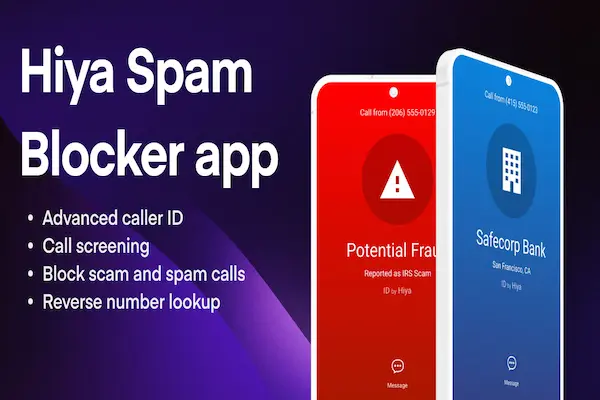
Hiya is a carrier-grade solution with partnerships at AT&T, T-Mobile, and Samsung — a level of infrastructure that consumer apps rarely achieve.
In 2024 alone, Hiya’s Samsung integration helped block over 31 billion fraud and spam attempts.
The app offers color-coded caller screens, automatic robocall blocking, community spam reporting, and reverse phone lookup — all available in a clean, intuitive interface.
Hiya is consistently highlighted in spam blocker reviews as the most balanced option: powerful enough for heavy protection, simple enough for non-technical users.
Available free on both iPhone and Android. Premium plan unlocks enhanced caller ID and additional scam trend data.
2. RoboKiller
RoboKiller is widely considered the best robo blocker for users who want aggressive, maximum-coverage protection.
The app uses patented audio fingerprinting and AI call analysis to detect robocalls before the first ring — and it goes one step further with “Answer Bots” that pick up spam calls and waste the scammer’s time.
It also functions as a strong app to stop spam texts, with built-in SMS filtering that catches phishing links and scam wording before they reach your main inbox.
RoboKiller claims to block up to 99% of spam calls, with a global database of over 1.4 billion analyzed calls powering its detection engine.
Available on iPhone and Android. Starts at $4.99/month with a 7-day free trial.
3. Truecaller
With over 300 million users worldwide, Truecaller brings a community-driven approach to spam protection that few competitors can match.
The app identifies unknown callers in real time, showing name, location, and whether the number has been flagged as spam by other users — before you even swipe to answer.
As a best phone number blocking app, Truecaller also supports custom block lists, automatic spam call blocking, and integration with WhatsApp and Telegram.
The free version covers the essentials. The premium tier ($2.99/month) adds advanced caller ID, incognito mode, and ad-free use.
4. Nomorobo
Nomorobo takes a different technical approach: it uses an audio captcha system to verify whether an incoming caller is human before allowing the call to ring through.
This makes it one of the most effective robo call blocker Android and iOS options for users who want to eliminate robocalls almost entirely — not just label them.
The app also supports VoIP lines and landlines, which is a meaningful advantage for users who still use traditional phone services alongside their mobile device.
Available for $2/month with a 14-day free trial. No cluttered interface — just effective, straightforward blocking.
5. YouMail
YouMail stands out by replacing your phone’s voicemail entirely with an intelligent system that blocks spam at the voicemail level.
When a known spam caller reaches voicemail, YouMail plays an “out of service” message — effectively tricking the system into removing your number from the caller’s list.
It also functions as a solid best cell phone call blocker with visual voicemail, call transcription, and a second phone number option for privacy.
Free version covers basic protection. Business plans range from $5.99 to $24.99/month depending on features needed.
Best Spam Blocker App for Android: What to Look For
Android users have more flexibility in how spam blocker apps can be configured — and more options to choose from.
The best spam app for Android is one that integrates smoothly with your phone dialer, requests only the permissions it genuinely needs, and keeps its database updated automatically in the background.
When evaluating an android app spam call blocker, pay attention to how the app handles permissions. Look for apps that clearly explain why each permission is needed — call screening, SMS access, and caller ID are legitimate. Anything unrelated to call/text protection is a red flag.
The best call spam blocker Android users consistently recommend is Hiya, followed closely by RoboKiller for users who want maximum blocking aggressiveness.
For budget-conscious users, a solid free spam removal app like Truecaller or Hiya’s free tier provides meaningful protection without any monthly cost.
Best Spam Blocker App for iPhone: iOS-Specific Tips
iPhone users need to enable spam protection through a specific iOS setting — and many people never realize this step is required.
After installing your chosen app, go to Settings → Phone → Call Blocking & Identification and toggle on the app’s permissions.
For text filtering, go to Settings → Messages → Unknown & Spam and enable the app’s SMS filtering there as well.
The best app for blocking spam calls iPhone needs both permissions active to deliver full protection — call identification alone won’t filter your texts.
Hiya is one of the most recommended options specifically for iOS, because its carrier partnerships mean it catches threats at the network level before they even reach your device.
If you want to layer protection, iOS also has a native “Silence Unknown Callers” option in Settings → Phone that sends all unrecognized numbers directly to voicemail — useful alongside any third-party app.
The Best App to Stop Spam Texts
Spam texts have evolved significantly. What used to be poorly worded prize notifications are now convincing messages that mimic banks, shipping companies, and government agencies.
The best app to stop spam texts needs to analyze message content — not just the sender number — because scammers frequently rotate numbers to avoid static blocklists.
RoboKiller and Hiya both include SMS filtering that scans for suspicious links, scam keywords, and known phishing patterns in message content.
Truecaller also filters spam texts effectively, especially for numbers that have been reported by its large community of users.
As a general rule: never click links in unexpected texts, even if the sender looks familiar. A good top spam call blocker app will also flag suspicious senders in your messages inbox — giving you a visual warning before you tap anything.
What Makes the Best Telemarketer Blocker App
Telemarketers and robocallers use different tactics, and the best telemarketer blocker app accounts for both.
Telemarketer calls often come from legitimate businesses with registered numbers — which means they may not appear in spam databases, but they’re still interrupting your day.
Look for apps that let you create custom block rules — like automatically blocking all calls from certain area codes, private numbers, or numbers not saved in your contacts.
The best app for stopping spam calls will combine database-driven blocking (for known threats) with rule-based filtering (for unknown but suspicious patterns) to cover both scenarios.
YouMail is particularly strong here, because its voicemail-level blocking removes your number from telemarketer call lists over time — reducing future calls, not just blocking them one by one.
Common Questions About Spam Blocker Apps
Is the app really free?
Yes — all five apps listed offer a free version that provides meaningful protection, including caller ID, spam labeling, and basic call blocking.
Premium features like advanced AI screening, SMS filtering, and scam trend reports are available for $2 to $5 per month depending on the app.
Can it accidentally block important calls?
False positives can happen with any app. That’s why allow lists exist — you can manually add important numbers (doctors, pharmacies, schools, delivery services) to ensure they always get through.
Start with labeling-only mode before enabling automatic blocking, and review your blocked calls log periodically during the first few weeks.
Is my data safe?
Reputable spam blocker apps like Hiya, Truecaller, and RoboKiller publish clear privacy policies explaining what data they collect and how it’s used.
Before installing any app, check whether community reporting can be disabled, what data is shared with partners, and whether an account is required to use the service.
Get Protected Before the Next Call
A spam blocker app is one of the highest-return investments you can make in your daily quality of life.
It costs nothing to get started, takes less than 10 minutes to set up, and immediately reduces the number of interruptions, scam attempts, and suspicious texts hitting your phone.
Whether you’re on iPhone or Android, there’s a reliable, well-reviewed option ready to download right now.
The best time to install one was before the last spam call you received. The second best time is today.
This content is independent and has no affiliation, sponsorship, or endorsement relationship with the companies or applications mentioned. All information is research-based and provided for informational purposes only.